
تصفح القدرات القوية التي تجعل CrystalDiskInfo المعيار الصناعي.
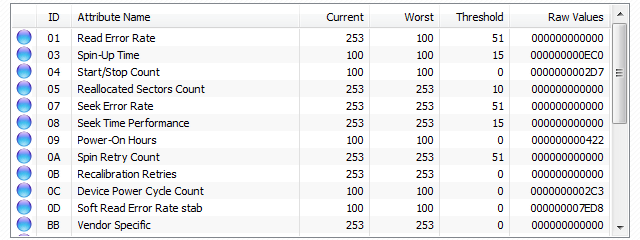
الوصول إلى القيم الأولية والموحدة لجميع سمات المراقبة الذاتية لتقييم سلامة المحرك فوراً.
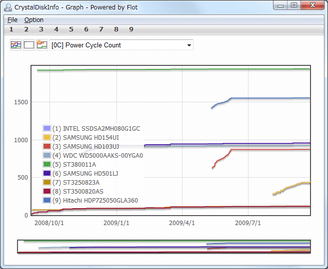
تتبع الاتجاهات التاريخية للسمات الصحية الحرجة مثل درجة الحرارة أو القطاعات المعاد تخصيصها.
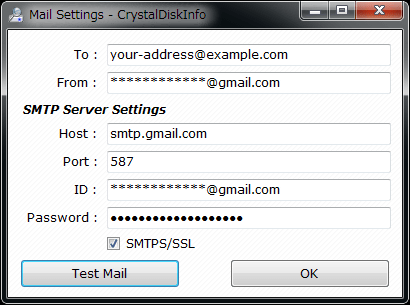
قم بتكوين تنبيهات البريد الإلكتروني التلقائية ليتم إعلامك فوراً إذا تغيرت حالة صحة المحرك.
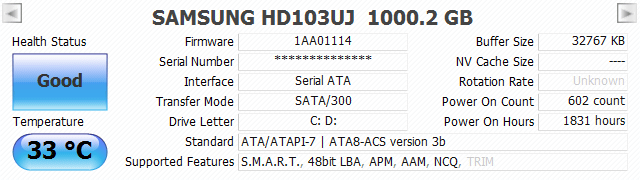
احصل على نظرة عامة فورية للتفاصيل الأساسية مثل إصدار البرنامج الثابت والرقم التسلسلي.
Automatically re-applies your custom Acoustic Management and Power Management settings every time the system boots.
Switch the temperature display between Celsius (°C) and Fahrenheit (°F) based on your preference.
Configure a specific delay at Windows startup to ensure all drives are fully spun up and recognized.
Toggle the display of S.M.A.R.T. raw data between Hexadecimal (16 [HEX]) and Decimal (10 [DEC]).
Customize how the application appears in the system tray, including icon behavior and visibility.
Define custom thresholds for what constitutes "Good", "Caution", or "Bad" health status for your drives.
Adjust the time range shown in real-time graphs, from minutes to weeks of historical data.
Set how often the application polls the drive for S.M.A.R.T. data updates (default is every 10 minutes).
Automatically map physical drives to their logical volume letters for easier identification.
Force a rescan of the system bus to find drives that may not have been detected initially.
Configure SMTP server details to send email notifications when drive health deteriorates.
Obfuscate drive serial numbers in the interface for privacy when sharing screenshots.
Adjust the interface scaling from 100% to 300% for high-DPI (4K/8K) monitors.
Write critical health alerts directly to the Windows Event Log for enterprise monitoring tools.
Enable direct ATA command sending for advanced diagnostics and controller compatibility.
اختر طريقتك. نفس المحرك القوي، سمات مختلفة.
.png)
.png)
.png)
.png)
"منقذ للحياة! نبهني إلى فشل SSD قبل أسبوع من حدوثه. تمكنت من نسخ جميع بياناتي احتياطياً في الوقت المناسب."
- أليكس ر.، مسؤول نظم
"أداة أساسية لأي بناء جهاز كمبيوتر. خفيفة وقوية وتصميم الزجاج الجديد يبدو رائعاً."
- سارة ل.، عاشقة للكمبيوتر
"الأفضل في فئته لمراقبة S.M.A.R.T. واجهة المستخدم الجديدة مذهلة، وميزة الرسم البياني مفيدة جداً."
- مايكل ت.، محلل بيانات
أداة قياس أداء التخزين المعيارية في الصناعة. قم بقياس الأداء المتسلسل والعشوائي لمحركات SSD و HDD ومحركات USB بدقة.
تحميل برنامج القياس
مجموعة شاملة لقياس أداء النظام. قيم أداء المعالج والقرص والرسومات ثنائية/ثلاثية الأبعاد (GDI/OpenGL) بأسلوب كلاسيكي.
احصل على Retro Suite
أحدث إصدار مستقر